
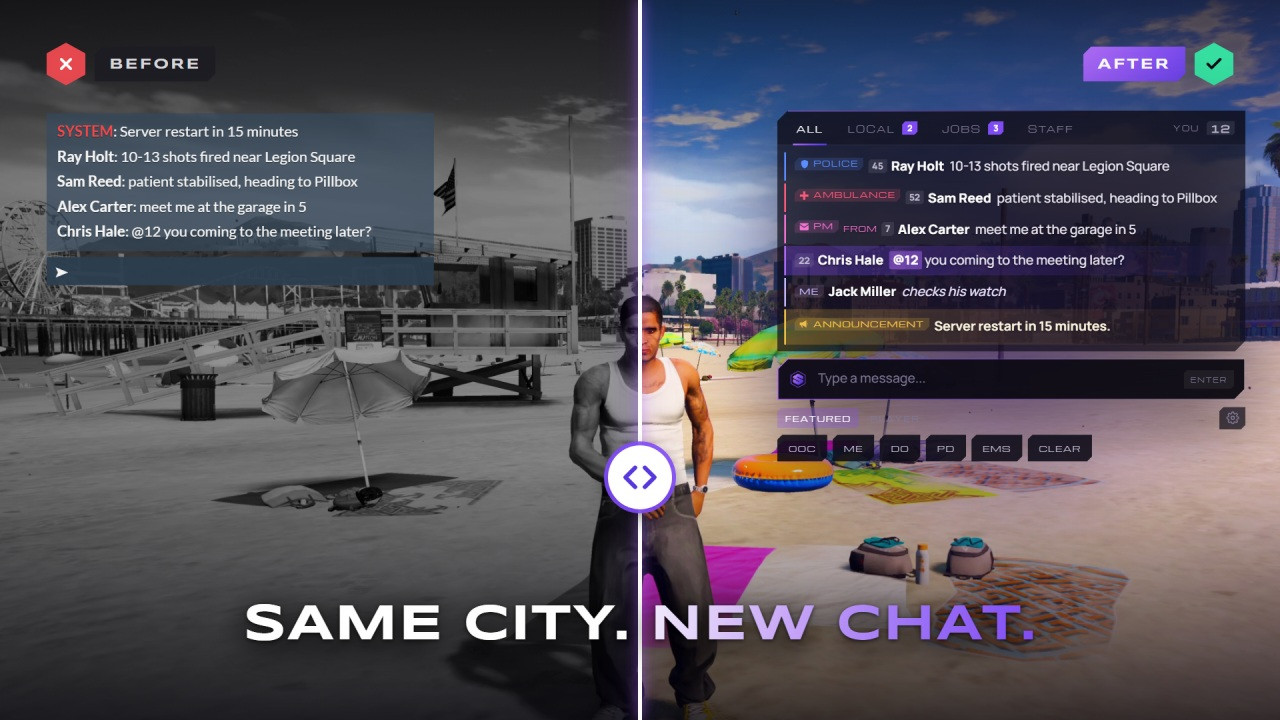
SOLID Chat replaces the default FiveM chat without breaking your other scripts. Every event and export of the default chat keeps working, so chat:addMessage, chatMessage and suggestions from your other resources show up exactly as before.
Players get tabs with unread badges, job and gang channels, private messages, mentions that ping and /me and /do bubbles above their head. Each player picks their own text size, chat size, opacity, timestamps and sounds, and keeps their own shortcut bar.
Admins set everything up in game with /chatsetup. Every change applies to every player right away, with no file to edit and no restart, and every save keeps a backup. It runs standalone, or on QBCore, Qbox and ESX with job and gang channels.
Highlights
- Tabs with unread badges
- Job & gang channels
- /me and /do bubbles
- PMs, @mentions & word filter
- Every setting in game
- 27 languages
- Category
- Essentials
- Released
- Sep 29, 2026
- Updated
- Sep 29, 2026
- Version
- 1.0.0
- Frameworks
- Standalone · QBCore · Qbox · ESX
Tabs & badges
All, Local, Jobs and Staff tabs. Every tab but All counts unread messages, and each player's last tab is remembered.
Job & gang channels
/pd, /ems, /darkweb and your own channels, each locked to jobs, gangs or an ace, with its own tag, colour and cooldown.
/me and /do bubbles
Roleplay text floats above the player for everyone in range, stacked, timed by length and hidden behind walls.
Private messages
/pm by server ID and /r to reply, with a cooldown and a soft sound that only the receiver hears.
Mentions that ping
@ID or a player's full name highlights the line and plays a ping for them.
Word filter & staff chat
Censor or block up to 200 words across every message, plus a private staff chat with its own tab.
Player settings
Text size, chat size, opacity, timestamps, sounds and a shortcut bar each player can rearrange.
/chatsetup in game
Channels, tabs, templates and every setting change live, with 12 backups, export and import.
- Version
- 1.0.0
- Frameworks
- Standalone · QBCore · Qbox · ESX
- Dependencies
- None
- OneSync
- Needed for /me and /do bubbles only
- Languages
- 27, switched in game
- Compatibility
- Every default chat event and export
- Setup
- In game with /chatsetup, no restart
- Escrow
- Protected · locales open
- v1.0.0majorLatest
- First release
- Tabs, job and gang channels, private messages, mentions and word filter
- /me and /do bubbles with range and line of sight
- /chatsetup with backups, export and import
- 27 languages
Will my other scripts still send messages?
Yes. SOLID Chat keeps every event and export of the default chat, including chat:addMessage, chatMessage and suggestions, so your other resources need no edits.
Do I need a framework?
No. It runs standalone, and channels then unlock through ace permissions. On QBCore, Qbox or ESX it also uses jobs, gangs and character names.
Can I change settings without a restart?
Yes. Admins open /chatsetup in game and every change applies to every player right away. Settings are saved on the server, so they stay through restarts and updates.
Who can see /me and /do?
Players within range and in the same routing bucket, and with line of sight unless you switch that off. The bubbles need OneSync. The rest of the chat works without it.
Which languages are included?
27, from English, Spanish and German to Arabic, Japanese and Hindi. Pick one in /chatsetup and every message and menu switches right away. Every text can be changed in the locales folder.
What about the default chat resource?
Remove ensure chat from your server.cfg. If you leave it in, SOLID Chat stops it on start, so the two never show at the same time.
Every command, colour-coded
Rename or switch off commands, and lock channels to jobs, gangs or an ace, in /chatsetup.
- PM
/pmPrivate message a player by server ID
- PM
/rReply to the last player who messaged you
- ME
/meAn action in a bubble above your head
- DO
/doDescribe the scene around you
- POLICE
/pdPolice channel, for police jobs or an ace
- AMBULANCE
/emsAmbulance channel, for EMS jobs or an ace
- DARKWEB
/darkwebGang channel that hides the sender's name
- ANNOUNCEMENT
/announceServer announcement, locked to an ace
- STAFF
/staffPrivate staff chat with its own tab
- SYSTEM
/clearClear your own chat
- ADMIN
/clearallClear the chat for everyone
- ADMIN
/chatsetupOpen the settings panel